Where your best experts teach every agent, and every teammate.

    A Studio is a workspace for each part of your business. Your experts teach agents what they know, see how agents reason in return, and turn it into Experts, Notes, Podcasts, Videos and Quizzes your whole team can learn from.

    Book a demo
    AI Studio
    Before / Traditional AI
    After / AI Studio

    The problem

    Your best judgment lives in a few heads.

    01

    Sarah leaves. Her playbook leaves with her.

    Six months later a new team rebuilds the same workflow from scratch, because nobody could see what she knew.

    02

    The people with the judgment can't shape the agent.

    Agent tooling is built for engineers, so the experts who know the right answer never get to teach it.

    03

    Experts turn into rubber stamps.

    When people only approve agent output, they stop learning the work, and their judgment fades.

    What a Studio is

    One Studio for every kind of work.

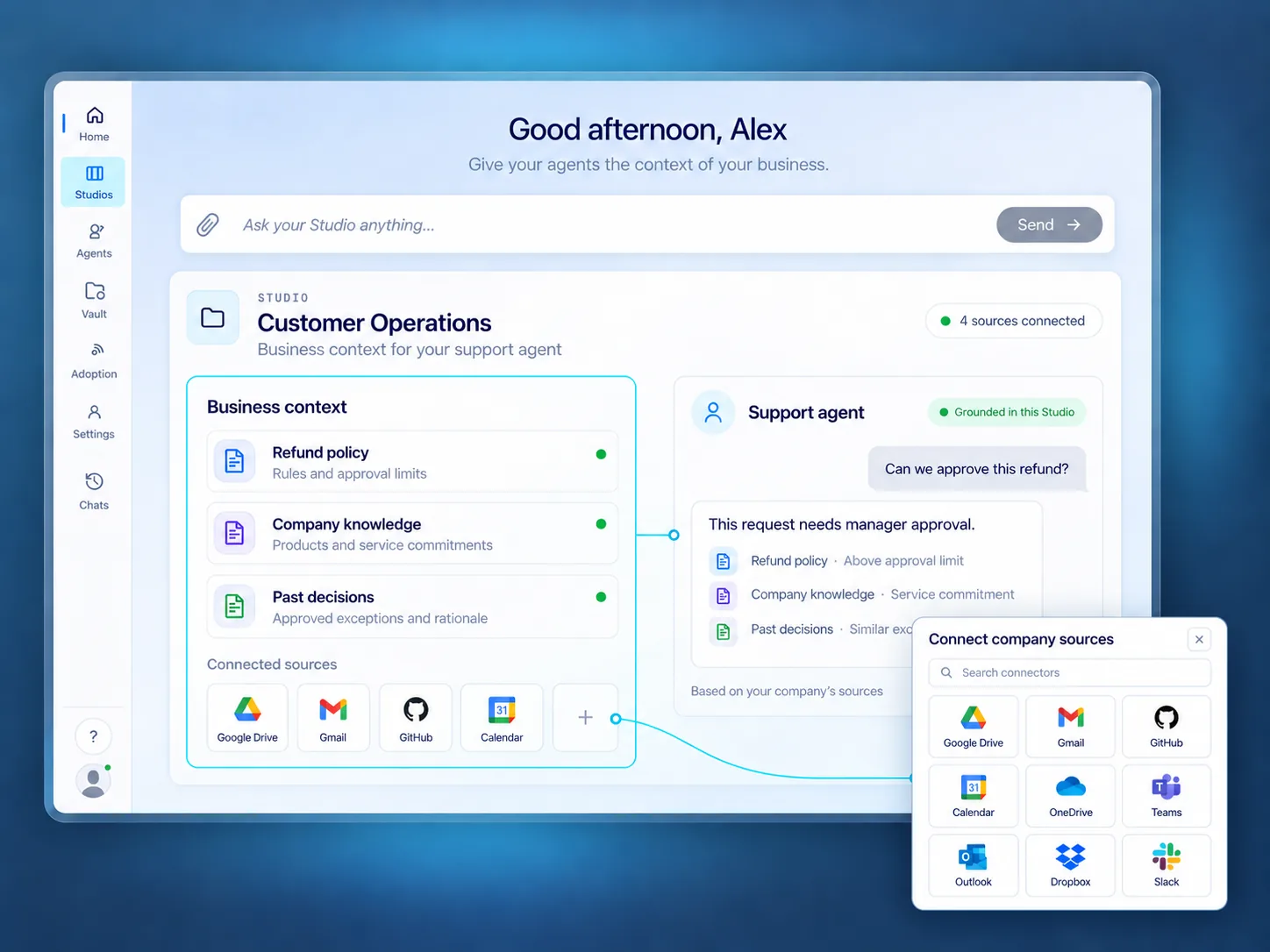
    Each Studio is scoped to one domain, like Support, Refunds or Compliance.

    Sources

    Refund policy, outage playbook and past tickets, synced from the tools you already use.

    Experts

    Maya, Support manager, approves what agents learn.

    Rules

    4.2a: outage refunds skip the $500 cap.

    Agents

    Support agent and Billing agent.

    AISquare · Studio
    AISquare Studio app workspace

    Customer Operations Studio

    Refund policy · Outage playbook · Past tickets

    AAgent asks

    Can I approve this $1,250 refund?

    Yes, under exception 4.2a.

    Rule 4.2a

    Same Studio app. Different knowledge, experts and rules for each team.

    Studios share one graph, so your second Studio starts where your first ended.

    Humans and agents, both ways

    Experts teach agents. Agents teach back.

    Expert to agent

    Correct it once. Every agent keeps it.

    AGENT PROPOSED

    Decline the $1,250 refund, over the $500 cap

    MAYA, SUPPORT MANAGER, CORRECTED

    Approve it, the outage breached our SLA

    BECOMES RULE 4.2a

    Outage refunds above the cap are allowed

    • Correct a decision right where it happened.
    • Once an expert approves, it becomes a standing rule.
    • Every agent on the Studio inherits it.
    See how Learnings works

    Agent to expert

    See how the work actually gets done.

    AISquare · Studio
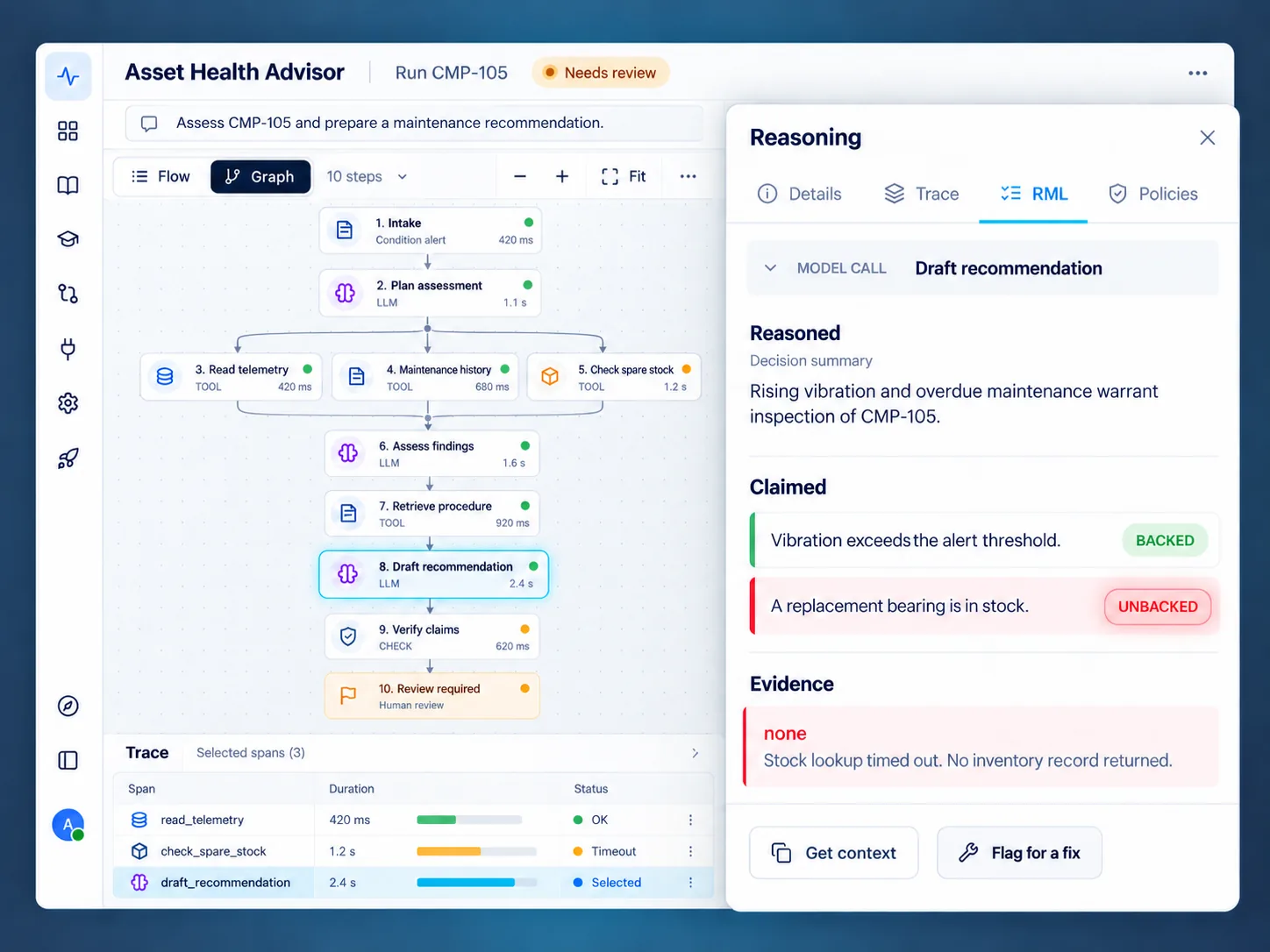
    AISquare reasoning view showing claims, assumptions, evidence and a human review flag
    • Read every run's reasoning in plain language: claims, assumptions and evidence.
    • See where an agent was unsure and asked for help.
    • Spot patterns across runs, like a rule that keeps tripping or an exception that keeps coming up.
    See RML and Explainability

    Your experts stay sharp because they see how the work gets done, not just the result.

    The human layer

    One Studio. Five ways your team learns from it.

    Everything a Studio knows can be turned into something people can use. Same knowledge your agents run on, every answer cited.

    01Connect sources02Ask and govern03Publish and share04Compound
    SL

    Support Expert

    Grounded

    When can I approve a refund above $500?
    When an outage breached the SLA. Confirm the breach, then approve and record why.
    Refund policy 4.2Outage playbook
    Does this apply to enterprise accounts?
    Yes, if the outage is confirmed on the account. Enterprise refunds above $5,000 also need finance sign-off.
    Refund policy 4.2Enterprise terms 7.1
    Got it, recording the reason now.
    Exactly. The decision and its citations are logged for the audit trail.
    Ask a follow-up
    Expert

    A conversational expert shaped by your experts.

    Ask the Studio and trace every answer back to approved knowledge.

    From Studio → Expert

    Question 3 of 5

    A customer asks for $900 after an outage. What do you do?

    Decline it, the cap is $500
    Confirm the SLA breach, approve, and record why
    Wait for finance to review

    Correct. The SLA exception covers it. Record why.

    Quiz

    A quiz that checks people understood.

    Test judgment with the same situations your team handles.

    From Studio → Quiz

    Outage refunds: how we decide

    1.Confirm the outage breached the SLA.
    2.Approve the refund and record why.

    Takeaway: the SLA exception overrides the standard cap.

    Cited from Refund policy 4.2

    Note

    A cited brief people can revisit.

    Turn approved knowledge into a practical brief.

    From Studio → Note

    MS

    Why outage refunds skip the cap

    2:14 / 8:00

    Podcast

    Audio episodes from your sources.

    Help the team learn the policy wherever they work.

    From Studio → Podcast

    Outage refunds: the 4.2a exception

    Policy

    Exception

    Approval

    Video

    A short explainer people can watch.

    Walk through the rule and its exception step by step.

    From Studio → Video

    PS

    Priya, Support lead, added the outage refund playbook. Sam, two weeks in, handled an outage refund the way Priya would.

    Share any of them with a link, or bring them into the tools your team already uses.

    AI can summarize your content.

    It can't capture the way you think.

    Why a Studio

    Why not a wiki, an LMS, or a notebook tool?

    ApproachAgents learn from itStays currentShared across the teamFormats people useEvery answer cited
    Wiki / knowledge base
    LMS / training decks
    Notebook-style AI toolsPartly
    AI Studios

    Studios are the one source your agents run on and your people learn from, kept current by every correction.

    Getting started

    Start your first Studio.

    01

    Connect your sources

    Playbooks, policies and past tickets from the tools you already use.

    02

    Invite the experts

    The people who own the domain review and approve what agents learn.

    03

    Point an agent at it

    Your agent runs on the Studio, and every correction makes it sharper.

    FAQ

    Questions about capturing expert knowledge for AI agents and teams.

    What is an AI Studio?

    An AI Studio is a workspace for one part of your business, like Support or Compliance. It holds that domain's sources, rules and experts, and the agents that run on them. Experts teach the agents, see how they reason, and turn the Studio's knowledge into material the whole team can learn from.

    How do experts add knowledge without engineers?

    They add files, playbooks and past decisions to a Studio and correct agent decisions where they happen. Once an expert approves a correction, it becomes a rule every agent on that Studio follows. No code and no redeploy.

    Can people see how agents reasoned?

    Yes. Every run is broken into claims, assumptions and evidence in plain language, and runs where an agent was unsure are flagged for a human. Experts can also see patterns across runs.

    What can a Studio create for people?

    Five experiences: an Expert you can chat with, a Note, a Podcast, a Video and a Quiz. Each one is built from the same knowledge your agents use, and every answer is cited.

    How is this different from notebook-style AI tools?

    Notebook tools make summaries and podcasts for one person from their own files. A Studio is shared by the team, kept current by every approved correction, and connected to the agents and rules running your work.

    Do Studios share knowledge with each other?

    Yes. All Studios sit on one Collective Intelligence Graph, so knowledge built for one team can ground another without uploading it again, while each Studio keeps its own scope and owners.

    Who can see what's in a Studio?

    Access follows the permissions you set and the permissions of the source systems. The graph runs in your cloud.

    Stop letting your best judgment walk out the door.

    Start your journey with AISquare

    Give your experts a Studio, and give every agent and every teammate what they know.

    Book a demo